Sort Vector in C++

Sort Vector in C++: Ascending and Descending Order

In C++ Programming Language, we are going to face some unique programming elements like Classes, Methods, OOPs, etc. A similar programming element or concept is Vector in C++. Along with defining the Vector in CPP, as a beginner, you should know to “Sort Vector in C++”.

You might be thinking that the Sorting of CPP Vectors will be a challenging task. However, with the help of a simple CPP Inbuilt Function, the entire operation can be completed. If you use that inbuilt function, there will be no need to worry about the size of the Vector.

This article will discuss some basics of the CPP Vectors. Along with that, we are going to shed some light on the processes by which sorting any Vector in C++ will become an easy task. So, let us start our discussion.

Summary or Key Highlights: 

  • A vector in CPP is more similar to the Array, but in this, there are no Size Restrictions available.
  • With the help of the Vector Keyword, the Vector can be defined.
  • Sorting of Vectors in CPP can only be done either in Ascending Order or Descending Order.
  • We have to use the Sort() Function for Sorting Vectors in CPP.
  • The third parameter of the sort () function will be crucial for adding many sorting variants.

What Is Vector In CPP Programming Language?

 Vector  is a special type of data structure present in C++ programming language. It is similar to the array concept. But there are some more features present in the vector concept.

In the array, there is no provision to increase the size of the array. But in the case of vectors, there is a concept to increase the size of the vector. In the runtime of the program execution, the memory can be increased.

We can declare the Vector in CPP with the help of the Vector Keyword. Also, while defining the Vector, we have to mark which type of Data is going to be placed in that. The memory of the vector can be dynamically increased. The elements of the vector will be placed continuously in the memory.

Let us check the following code where we have demonstrated the way to Declare Vector in C++ Language.


#include <bits/stdc++.h> 
using namespace std; // We Will Use Namespace STD
int main()
{
    vector<int> Vector-Name; //Empty Vector Declaration With Name
    vector<int> Vector-Name {10, 8, 90, 40, 5, 30, 24}; // Vector Declaration With Values
    return 0;}


What Is The Method For Sorting Vector In CPP Language?

Now, before we move to our central discussion point, we have to understand the methods needed for Sorting any Vector in C++ Language. To Sort Vectors either in Ascending or Descending Order, we have to use the Sort() Function only which is the Built-in Function also.

Sort() is a function that can act on the vector. Not on the vector, but it can be used for any Data Structure. The Sort() function is not used to return anything. From any given index number, it can sort the elements within seconds. That is the reason; the sort function is used to format the data in the given order.

General Syntax: sort(Vector-Name.begin(),Vector-Name.end(), Optional Third Parameter);

There is a total of three parameters that can be passed to the Sort() function. Among them, the first two arguments are related to the Starting & Ending Point of the Vector. The First One will be the Starting Number of the Vector. The Second One will be the Ending Index of the Vector.

There is also another argument present that determines the Format of the Sorting. If you don’t put anything, the Vector will be sorted in the Ascending Manner. To sort vectors in Descending, you have to work on the Third Parameter. We are going to practice this in the upcoming sections.

How To Sort CPP Vectors In Ascending Order?

Now, we have learned about the Sort() Function and its syntax in CPP Language. Now, it is time to use the Sort() Function for Practical Purposes. Every Time Sorting can be done either in Ascending or Descending Order. Here, first, we are going to learn the process for Sorting Vectors in Ascending Order.

For that purpose, we have three potential ways. Let us start with the very first process where we don’t have to work much.

Process 1: Using Simple Sort() Function 

In this process, we will simply use the Sort() Function where only two parameters will be used. That means the Third One will not be utilized here. As per the syntax rule of the function, if the Third Argument is not present, then it will by default make the vector the Ascending one.


#include <bits/stdc++.h> 
using namespace std; // We Will Use The STD
int main()
{
    vector<int> zap{ 10, 80, 90, 46, 57, 30, 14}; // Declaration Of Vector
    sort(zap.begin(), zap.end()); // Using Simple Sort Function For Ascending Order
    cout << "Ascending Order Using Simple Sort Function: \n";
    for (auto coding : zap) // Printing Vector With COUT
        cout << coding << "-";
    return 0;
}


Steps Of The Program: 

  • Here, first, we need to declare one Integer Vector. Here, we are not going to take the user input.
  • After that, we need to use the Sort() vector function. There we need to provide Two Arguments.
  • The first one will be the Beginning Index of the Vector. And the second one will be the Ending Index of the Vector.
  • After that, we need to use the For Each Loop to print all the data.
  • Inside that, we will use the Auto X process to print the values. For printing values, we will use the COUT Method in CPP.

Output: 

Simple Asc Sort

From the above output, we can see that values of the Vector are coming in the Ascending Order. The smallest number is coming first and the largest number is coming at the last. So, the use of the function is successfully done by the above CPP Code.

Process 2: Using Comparator Function 

Now, another approach will be to use the Comparator Function. In the Comparator Function, we have to use the Third Position of the Sort() Function. And there we have to provide the Name of the User-Defined Function where all instructions are given on which the sorting will be done.


#include <bits/stdc++.h> 
using namespace std; // We Will Use The STD

bool Asc(int a, int b) {
    return a < b; // Sort In Ascending Order
}

int main()
{
    vector<int> zap{10, 80, 90, 40, 50, 30, 24}; // Declaration Of Vector
    sort(zap.begin(), zap.end(), Asc); // Using Comparator Function For Ascending Order
    cout << "Ascending Order: \n";
    for (auto coding : zap)  // Printing Vector With COUT
        cout << coding << "-";    
    
    return 0;
}


Steps Of The Program: 

  • In the Main Function, we have to declare the Integer Vector.
  • We have to declare another function where the Ascending Logic will be developed.
  • Now, we have to call the Sort() Function where all positions will be occupied.
  • In the third position of the function, we have to provide the New Function Name.
  • Later, we have to use the Auto X method along with the COUT to print all the values.

Output: 
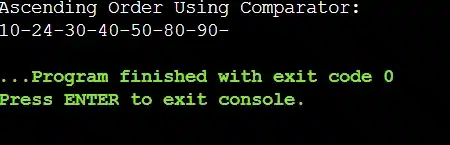
 Asc With Comparator

From the above output, we can see that the values of the vector declared in the program are coming as we are expecting. That means, the lower values are coming first and the Higher Values are coming last. So, we have successfully sorted the vectors.

Process 3: Using Lambda Expressions 

Another important process will be to use the Lambda Expression. You might know about the Lambda Expressions and its working process. In the Third Place of the Sort() Function, we have to use the Lambda Expression where we have to put the logic.


#include <bits/stdc++.h> 
using namespace std; // We Will Use The STD

int main()
{
    vector<int> zap{10, 8, 90, 40, 5, 30, 24}; // Declaration Of Vector
    sort(zap.begin(), zap.end(), [](int a, int b) {return a < b;}); // Using Lambda For Ascending Order
    cout << "Ascending Order Using Lambda: \n";
    for (auto coding : zap) // Printing Vector With COUT
        cout << coding << "-";    
    
    return 0;
}


Steps Of The Program: 

  • In the program, we have to define the Vector where only Int values will be accepted.
  • We have to provide the Values there as well randomly.
  • Now, we have to use the Sort() and in the third place, we have to place the Lambda Expression.
  • Now, we have to use the same logic that we have used for the Comparator Function.
  • Now, use the COUT Logic to print the values one by one.

Output: 

 Asc With Lambda

The above output clearly shows that all the values of the vector are coming in the Ascending Order. So, the developed expressions are working completely fine with the Sort(). So, the above C++ Code is successfully developed.

How To Sort CPP Vectors In Descending Order?

 Now, after discussing intensively the processes needed to Sort Vector in the Ascending Manner, it is time to discuss the processes for the Descending Order. And there are three ways present to make the vector in the Descending Pattern.

Let us start with the process where the Greater() will be used along with the Sort(). And Greater() should also be placed in the third place of Sort().

Process 1: Using Greater() Function 

The Greater Function should be declared along with the Data Type on which it is going to act. The Greater() Function will push the Greater or Larger Values to the start of the Vector. Hence, it will make the vectors in the Descending Pattern.


#include <bits/stdc++.h> 
using namespace std; // We Will Use The STD
int main()
{
    vector<int> zap{ 10, 80, 90, 46, 57, 30, 14}; // Declaration Of Vector
    sort(zap.begin(), zap.end(),greater<int>()); // Using Greater Function For Descending Order
    cout << "Descending Order Using Greater Function: \n";
    for (auto coding : zap) // Printing Vector With COUT
        cout << coding << "-";
    return 0;
}


Steps Of The Program: 

  • At first, the Vector will be declared along with some values given to it.
  • Now, the Sort() will be declared where in the third place, we have to put the Greater() Function.
  • Now, we will use the COUT to print all the values in the new order.

Output: 
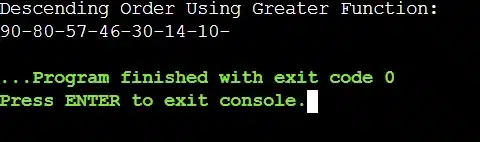
Dsc With Greater

From the above output, we can see we are getting the values opposite of what we have seen till now. Here, the Larger Number or Greater Number is coming at the front whereas the Smaller Number is coming at the End. So, the values are coming in the Descending Pattern.

Process 2: Using Comparator Function 

Now, we have to again use the Comparator Function or Comparison Function. Whatever logic we have used for the Ascending Order, we are going to use the opposite logic for the Descending Order. Let us check the following code to understand the process better.


#include <bits/stdc++.h> 
using namespace std; // We Will Use The STD

bool Des(int a, int b) {
    return a > b; // Sort In Descending Order
}

int main()
{
    vector<int> zap{10, 80, 90, 40, 50, 30, 24}; // Declaration Of Vector
    
    sort(zap.begin(), zap.end(), Des); // Using Comparator Function For Descending Order
    cout << "Descending Order Using Comparator: \n";
    for (auto coding : zap) // Printing Vector With COUT
        cout << coding << "-";
    return 0;
}


Steps Of The Program: 

  • In the Main Function, we have to first declare the Integer Vector.
  • We have to declare another function where the Descending Logic will be developed.
  • Now, we have to call the Sort() Function where in the third position, we have to provide the New Function Name.
  • Later, we have to use the COUT to print all the values.

Output: 

 Dsc With Comparator

From the above output, we can see that the 90 Value is coming at the beginning whereas the 10 Value is coming at the End. So, the pattern shows that the values are aligned in the Descending Order. Hence, the above Comparator Function & its logic is working fine.

Conclusion:

As we saw it is very important to understand the “Sort Vector in C++” programming language.

We need to understand how to sort a vector in CPP. This will help us a lot to solve difficult problems in the future.

It is advised to clear the basic concept of the C++ programming language. It will help to understand the sorted vector in CPP in a very easy & clear manner.

So, hope you have liked this piece of article. Share your thoughts in the comments section and let us know if we can improve more.

Domycodinghomework also offers a wide range of programming and coding help services for you to benefit from. Don’t miss out! Visit https://domycodinghomework.com/ and our expert team will be there to help you out.

Takeaways: 

  • If you want to sort the Vector, you have to just use the Sort() Function.
  • The Sort() not only works on the Vector, but it can also work on other Data Structures as well.
  • The Default Sort() syntax will be to make values in Ascending Order only.
  • As per your need, we can use the Third Argument of Sort() function.
  • If you want to sort vectors in Descending, we have to certainly use the Third Parameter of Sort().

Leave a Comment

Your email address will not be published. Required fields are marked *