

If you have a Java inheritance assignment sitting in front of you and the instructions look confusing, you are in the right place. Inheritance is one of the first big object-oriented ideas that college and high school students meet in a Java course, and it shows up in almost every OOP homework, lab, and exam.
This guide breaks the whole topic down in plain English, walks you through every type of inheritance with runnable code, shows you a full assignment solved from start to finish, and points out the exact mistakes that quietly cost students marks.
By the end you will understand not just what inheritance is, but how graders actually score it and how to write a solution you can defend if your teacher asks you questions about it.
What Is Inheritance in Java? (In Simple Words)
Inheritance is a way for one class to reuse the fields and methods of another class. The class that shares its code is called the parent class (also called the superclass or base class). The class that receives that code is called the child class (also called the subclass or derived class).
Think about a school. Every person on campus has a name and an age. A teacher is a person, and a student is a person. Instead of writing the name and age code three separate times, you write it once in a Person class and let Teacher and Student inherit it. That is inheritance in one sentence: write shared code once, reuse it everywhere it fits.
In Java you set up this relationship with the extends keyword.
					class Person {
    String name;
    int age;

    void introduce() {
        System.out.println("Hi, I am " + name + " and I am " + age + " years old.");
    }
}

class Student extends Person {
    String school;

    void study() {
        System.out.println(name + " is studying at " + school);
    }
}
Notice that Student never declares name or age, yet it can use them. That is because Student extends Person, so it inherits both fields and the introduce() method automatically.
					public class Main {
    public static void main(String[] args) {
        Student s = new Student();
        s.name = "Maya";
        s.age = 19;
        s.school = "State University";

        s.introduce();   // inherited from Person
        s.study();       // defined in Student
    }
}
Output:
Hi, I am Maya and I am 19 years old.
Maya is studying at State University
This is the core idea behind almost every Java inheritance assignment you will get. The class names change (Employee, Vehicle, Shape, Animal, BankAccount), but the pattern stays the same.
Why Inheritance Matters in Your Assignments
Teachers assign inheritance problems because they want to see if you understand three things: how to spot a real parent-child relationship, how to avoid repeating code, and how to organize a program so it stays readable as it grows. When a rubric mentions “code reuse,” “class hierarchy,” or “OOP design,” inheritance is usually what they are testing.
The main benefits your assignment is probably asking you to demonstrate are:
- Code reuse. Shared logic lives in one place, so you write and fix it once.
- Cleaner structure. A clear hierarchy shows how your classes relate, which makes the program easier to read and grade.
- Easier changes. Update the parent class and every child gets the update.
- A path to polymorphism. Inheritance is the setup that lets method overriding work, which many assignments grade in the same task.
Key Terms You Need Before You Write Any Code
Rubrics love these words, so know them cold.
- Superclass / parent class / base class: the class being inherited from.
- Subclass / child class / derived class: the class doing the inheriting.
extends: the keyword that creates the inheritance link.super: a keyword that lets a child call the parent’s constructor or methods.- Overriding: rewriting an inherited method in the child so it behaves differently.
- IS-A relationship: the test for whether inheritance even fits. A
DogIS-AAnimal, so inheritance works. ACaris NOT AEngine, so it should not extendEngine.
Keep that IS-A test in mind. Half of the design mistakes in inheritance assignments come from forcing a parent-child link where one does not really exist.
Basic Syntax of Inheritance in Java
The general shape looks like this:
					class Parent {
    // fields and methods shared by all children
}

class Child extends Parent {
    // extra fields and methods just for Child
}
Java supports three types of inheritance directly through classes: single, multilevel, and hierarchical. It also supports multiple and hybrid inheritance, which you build using interfaces. Most assignments ask you to identify or implement at least two of these, so here is a clear example of each.
A child class inherits every non-private field and method from its parent. Private members still exist in memory, but the child cannot touch them directly. It has to go through public or protected methods, which is exactly how good encapsulation is supposed to work.
Types of Inheritance in Java (With Code for Each)
Java supports four types of inheritance directly through classes, plus a fifth pattern you build using interfaces. Most assignments ask you to identify or implement at least two of these, so here is a clear example of each.
1. Single Inheritance
One child class extends one parent class. This is the most common form and the easiest to explain.
					class Vehicle {
    void start() {
        System.out.println("The vehicle starts.");
    }
}

class Car extends Vehicle {
    void honk() {
        System.out.println("Beep beep!");
    }
}
Car gets start() from Vehicle and adds its own honk() method.
2. Multilevel Inheritance
A class inherits from a class that already inherits from another class, forming a chain.
					class Vehicle {
    void start() {
        System.out.println("The vehicle starts.");
    }
}

class Car extends Vehicle {
    void honk() {
        System.out.println("Beep beep!");
    }
}

class SportsCar extends Car {
    void turbo() {
        System.out.println("Turbo boost activated!");
    }
}
Here SportsCar can use start(), honk(), and turbo(). The chain runs Vehicle to Car to SportsCar. Each level adds something new.
3. Hierarchical Inheritance
Several child classes share the same single parent, like siblings in a family.
					class Shape {
    void describe() {
        System.out.println("I am a shape.");
    }
}

class Circle extends Shape {
    void area(double r) {
        System.out.println("Area = " + (3.14 * r * r));
    }
}

class Rectangle extends Shape {
    void area(double length, double width) {
        System.out.println("Area = " + (length * width));
    }
}
Both Circle and Rectangle inherit describe() from Shape, but each calculates area in its own way.
4. Multiple Inheritance (Through Interfaces Only)
Java does not allow a class to extend more than one class. This is on purpose. If two parents had a method with the same name, the compiler would not know which one to use. That confusion is called the diamond problem, and Java avoids it by banning multiple class inheritance.
You can still pull behavior from more than one source by using interfaces.
					interface Swimmer {
    void swim();
}

interface Walker {
    void walk();
}

class Duck implements Swimmer, Walker {
    public void swim() {
        System.out.println("The duck swims.");
    }
    public void walk() {
        System.out.println("The duck walks.");
    }
}
Duck gets behavior from two interfaces at once, which safely gives you the effect of multiple inheritance.
5. Hybrid Inheritance
Hybrid inheritance is any mix of the types above, for example hierarchical plus multilevel in the same program. Because pure multiple inheritance is not allowed with classes, real hybrid designs in Java always lean on interfaces for the multiple part.
The super Keyword: Talking to the Parent Class
The super keyword lets a child class reach up to its parent. You use it in two common ways.
Calling the parent constructor with super(...). This must be the first line in the child constructor.
					class Person {
    String name;

    Person(String name) {
        this.name = name;
    }
}

class Student extends Person {
    String school;

    Student(String name, String school) {
        super(name);        // runs the Person constructor first
        this.school = school;
    }
}
Calling a parent method that the child has overridden, using super.methodName(). This is handy when you want to add to the parent behavior instead of fully replacing it.
Method Overriding: Same Name, New Behavior
Overriding happens when a child class writes its own version of a method it inherited. The method name, return type, and parameters stay the same, but the body changes. This is how you get runtime polymorphism, which is a favorite grading point.
					class Animal {
    void makeSound() {
        System.out.println("Some generic animal sound.");
    }
}

class Dog extends Animal {
    @Override
    void makeSound() {
        System.out.println("Woof!");
    }
}
Always add the @Override annotation above the method. It tells the compiler to double-check that you are really overriding something. If you misspell the method name, the compiler will catch it instead of silently creating a brand new method. Graders notice when you use @Override correctly, because it shows you understand the difference between overriding and accidentally writing a new method.
Constructors and Inheritance: The Part That Trips People Up
Constructors are not inherited. Each class writes its own. When you create a child object, Java runs the parent constructor first, then the child constructor. If your parent class only has a constructor that takes arguments, the child must call it with super(...), or the code will not compile.
					class Account {
    double balance;

    Account(double balance) {
        this.balance = balance;
    }
}

class SavingsAccount extends Account {
    double interestRate;

    SavingsAccount(double balance, double interestRate) {
        super(balance);              // required, or you get a compiler error
        this.interestRate = interestRate;
    }
}
If you forget the super(balance) line here, you will see an error like “there is no default constructor available in Account.” Knowing this one rule prevents a huge share of the errors students hit in inheritance homework.
A Complete Worked Assignment: Employee Hierarchy
Many Java inheritance assignments use an employee hierarchy or vehicle classes, so let us solve a realistic one from start to finish. This is the kind of complete, tested answer a rubric expects.
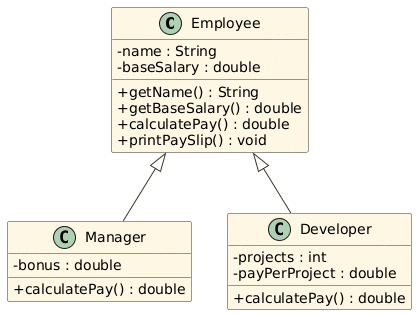
The task: Build an Employee base class with a name and a base salary. Create a Manager and a Developer that both extend Employee. Each should calculate total pay differently. A manager earns a bonus on top of base salary, and a developer earns extra pay per completed project.
Before writing any code, it helps to sketch the structure. The diagram below shows the plan:
Employeeis the parent class holding the shared fields and methods, whileManagerandDevelopereach extend it and overridecalculatePay()to handle pay their own way. The hollow arrows pointing up toEmployeeare the standard UML way to show inheritance.
Note: Kindly use the provided code only for reference and learning purposes. Our tutors have loaded the comments so that you can understand the code line by line.
					// ===== Parent class (superclass) =====
// Employee holds the data and behavior shared by every type of employee.
class Employee {
    // Private fields: kept hidden so no outside class can change them directly.
    // This is encapsulation. Access happens only through the methods below.
    private String name;
    private double baseSalary;

    // Constructor: runs when a new Employee (or any child) object is created.
    // It sets the starting values for name and baseSalary.
    Employee(String name, double baseSalary) {
        this.name = name;            // "this.name" is the field, "name" is the parameter
        this.baseSalary = baseSalary;
    }

    // Getter: lets child classes and other code read the name safely.
    public String getName() {
        return name;
    }

    // Getter: child classes use this to read baseSalary since they can't touch it directly.
    public double getBaseSalary() {
        return baseSalary;
    }

    // Base version of pay. A plain Employee just earns the base salary.
    // Child classes will override this to add their own pay rules.
    public double calculatePay() {
        return baseSalary;
    }

    // Shared method inherited by every child. It prints a simple pay slip.
    // Notice it calls calculatePay(), so each child automatically prints its own pay.
    public void printPaySlip() {
        System.out.println(name + " earns $" + calculatePay());
    }
}

// ===== Child class 1 =====
// Manager IS-A Employee, so it extends Employee and reuses all of its code.
class Manager extends Employee {
    private double bonus;   // extra field that only managers have

    // Constructor: passes name and baseSalary up to the Employee constructor with super(...),
    // then sets the manager-only bonus field.
    Manager(String name, double baseSalary, double bonus) {
        super(name, baseSalary);   // must be the first line; runs the parent constructor
        this.bonus = bonus;
    }

    // Override: a manager's pay is base salary plus a bonus.
    // @Override tells the compiler to check this really matches a parent method.
    @Override
    public double calculatePay() {
        return getBaseSalary() + bonus;   // getBaseSalary() reads the private parent field
    }
}

// ===== Child class 2 =====
// Developer IS-A Employee too, so it also extends Employee.
class Developer extends Employee {
    private int projects;          // how many projects the developer finished
    private double payPerProject;  // how much each finished project pays

    // Constructor: sends the shared data to the parent, then sets developer-only fields.
    Developer(String name, double baseSalary, int projects, double payPerProject) {
        super(name, baseSalary);
        this.projects =
Output:
Priya earns $75000.0
Leo earns $63000.0
Look at what this solution demonstrates, because these are the exact things a grader checks. The base class holds shared data with private fields and public getters, which is clean encapsulation. Each child overrides calculatePay() to behave differently, which is polymorphism. The loop treats every object as an Employee but still runs the correct child version of the method, which proves the design actually works. If your homework asks for vehicle classes, shapes, or bank accounts instead, the same structure applies. Swap the names and the pay logic, and keep the pattern.
What Your Professor Actually Grades in an Inheritance Assignment
Here is the information most tutorials skip, and it is the part that decides your grade. Graders rarely give full marks just because the code compiles and prints the right output. Based on how OOP rubrics are usually written, points are split across several areas, and students lose marks in the same predictable places every semester.
Most rubrics reward these five things. First, correct hierarchy design, meaning your parent-child relationships pass the IS-A test and you did not force inheritance where composition made more sense. Second, real code reuse, meaning shared logic lives in the parent and is not copy-pasted into each child. Third, proper use of super, @Override, and access modifiers, which shows you understand the mechanics and not just the syntax. Fourth, working, tested output that matches the sample the assignment gave you, including spacing and formatting. Fifth, readable code with short comments on the parts that carry the real logic. If your instructor also asks for a UML diagram or a written explanation, treat that as its own graded item and do not leave it blank, because it is often worth more points than students expect.
The quiet grade-killers are just as predictable. Putting all your logic inside main() instead of inside the classes tells the grader you did not really use OOP. Overriding a method but forgetting @Override can hide a bug where you accidentally created a new method. Making every field public throws away encapsulation. And building a five-level inheritance chain for a task that needed one parent and two children signals that you were guessing rather than designing. Knowing this list before you submit lets you self-check your own work the way your teacher will.
When You Should NOT Use Inheritance
This is the second point almost every competing guide ignores, and understanding it will set your assignment apart. Inheritance is not always the right tool, and mature Java code often chooses composition instead. Composition means a class has a thing rather than is a thing.
The rule is simple. Use inheritance only when the child truly IS-A version of the parent and will use most of the parent’s behavior. If the relationship is really “has a” or “uses a,” build it with a field instead. A Car should not extend Engine, because a car is not a type of engine. A car has an engine, so Engine belongs as a field inside Car.
					class Engine {
    void run() {
        System.out.println("Engine is running.");
    }
}

class Car {
    private Engine engine = new Engine();   // composition, not inheritance

    void drive() {
        engine.run();
        System.out.println("Car is moving.");
    }
}
If your assignment gives you freedom in how to model the classes, mentioning in your comments or report why you chose inheritance over composition (or the other way around) is the kind of reasoning that earns full design marks. Most students never explain their choice, so doing it makes your submission stand out to a grader.
Common Inheritance Errors and How to Fix Them
These are the compiler messages that show up most often in inheritance homework, along with the fix.
- “There is no default constructor available in [Parent].” Your parent class only has a constructor with parameters, and the child did not call it. Add
super(...)as the first line of the child constructor. - “[method] in [Child] cannot override [method] in [Parent].” The return type or parameters do not match the parent method exactly. Make the signatures identical.
- “cannot find symbol” when accessing a parent field. The field is probably private. Add a public getter in the parent and use that instead.
- A method runs the parent version when you expected the child version. You likely forgot to override it, or you overloaded it (different parameters) instead of overriding it (same parameters). Add
@Overrideand confirm the signatures match.
How to Test Your Inheritance Code Before Submitting
Do not submit after a single run. Create at least one object of each child class, call the shared inherited methods, and call the overridden methods to confirm each child behaves differently. Store your objects in a parent-type array or list and loop through them, the way the employee example above does. If the loop prints the correct child behavior for every object, your polymorphism is working. Then check your output against the assignment’s sample output character by character, since teachers often compare them directly.
Need Help Finishing Your Java Inheritance Assignment?
Understanding the theory is one thing, but a tight deadline with a multi-class project, a UML diagram, and a written report is another. If you would rather have a Java expert build a clean, tested, and fully commented solution that matches your rubric and your course level, our team can do your Java homework for you. You get readable code you can actually explain, sample output, and a short walkthrough of how the inheritance is set up, so you are ready if your instructor asks questions.
FAQ's (Questions Students Ask Us )
What is inheritance in Java in simple words?
Inheritance lets one class reuse the fields and methods of another class using the extends keyword. The class that shares code is the parent, and the class that receives it is the child. It saves you from writing the same code twice.
How many types of inheritance does Java support?
Java supports single, multilevel, and hierarchical inheritance directly through classes. It does not support multiple inheritance with classes because of the diamond problem, but you can achieve the same effect using interfaces. Hybrid inheritance is a mix of these patterns.
Why does Java not allow multiple inheritance with classes?
If a class could extend two parents that both had a method with the same name, the compiler would not know which one to run. This is the diamond problem. Java avoids it by only allowing one parent class, while letting you implement multiple interfaces safely.
Are constructors inherited in Java?
No. Each class writes its own constructor. When you create a child object, Java runs the parent constructor first, and you call it with super(...). If the parent has no default constructor, the child must call super with arguments or the code will not compile.
What is the difference between overriding and overloading?
Overriding means a child class rewrites an inherited method using the same name and parameters to change its behavior. Overloading means writing multiple methods with the same name but different parameters in the same class. Overriding relates to inheritance, overloading does not.
When should I use composition instead of inheritance?
Use inheritance when the child truly IS-A type of the parent. Use composition when the relationship is really “has a.” A car has an engine, so the engine should be a field inside the car, not a parent class.
